 BudsMicSwitcher
Your earbuds sound muffled on your Mac? Fix it.
BudsMicSwitcher keeps your music in full stereo and lends your earbuds' mic to calls only. Automatically.
Free & open source · macOS 14.2 or later · Any Bluetooth earbuds
Bluetooth earbuds can't do both at once
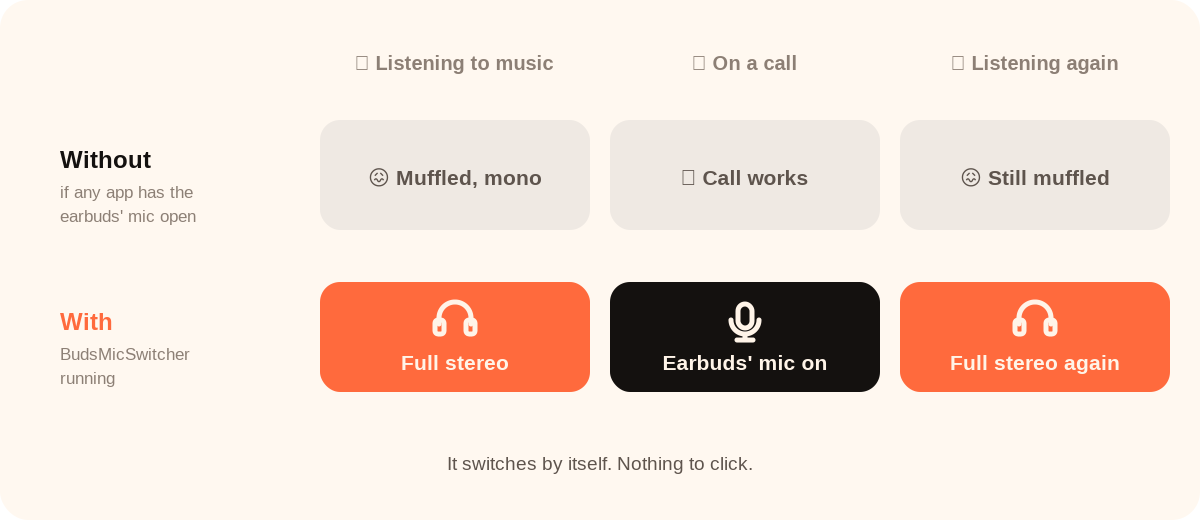
The moment any app opens your earbuds' microphone, your Mac switches them to "phone call" sound: mono and muffled. BudsMicSwitcher keeps the earbuds' mic closed until you're actually on a call.
Set it once. Forget about it.
Music sounds great
Your earbuds stay in full stereo while you listen to music, videos and games.
Calls just work
Join Zoom, Meet, Teams or Discord and your earbuds' mic turns on by itself.
Fully automatic
Lives in your menu bar, starts with your Mac, and switches back the second you hang up.
Private
Never records or listens to audio, never goes online. Every line of code is public.
Three commands and you're done
No coding needed. You'll paste three lines into the Terminal app.
Use an AI assistant? Paste one prompt.
Copy this into an AI tool that can run commands on your Mac (like Claude Code, Codex or Cursor). It checks what's needed, reads the code first, installs everything and confirms it works.
Read the prompt first
Open Terminal
Press ⌘ Space, type Terminal, and press Return.
Install Apple's free developer tools
A window pops up: click Install and wait. This also installs git, which step 3 needs. If it says "already installed", you're all set.
xcode-select --installDownload BudsMicSwitcher
git clone https://github.com/yanukadeneth99/BudsMicSwitcher.gitInstall and start it
When it says Installed, a headphones icon appears in your menu bar.
cd BudsMicSwitcher && ./install.shOne quick setting: in your call app, set the microphone to "Same as System" or "Default", so BudsMicSwitcher can hand it your earbuds' mic. Prefer pictures? Get the step-by-step PDF guide.
Help make it a one‑click download
Right now you install BudsMicSwitcher with Terminal commands. A $99/year Apple Developer account lets us sign the app, so you could just download it and open it. No commands, no developer tools.
Every bit counts. BudsMicSwitcher stays free and open source either way.
- Signed and notarized by Apple
- Download, open, done
- Automatic updates later on
Good to know
Does it work with my earbuds?
Yes, if they're Bluetooth. It works with any Bluetooth earbuds or headset, including AirPods, Galaxy Buds, Sony, Bose, Nothing and CMF.
Which call apps does it support?
Zoom, Microsoft Teams, Discord, Slack, FaceTime, WhatsApp and Telegram, plus calls in Chrome, Safari, Arc, Brave, Edge and Firefox (like Google Meet).
My call app isn't on the list. What do I do?
Tell us and we'll add it. Open an issue on GitHub or email [email protected] with the app's name. If you can, start a call in it and include the output of this Terminal command, which shows the app's ID: ~/Applications/BudsMicSwitcher.app/Contents/MacOS/BudsMicSwitcher --status
Why do I have to type commands? Can't I just download it?
Not yet. To let you download and open an app without warnings, Apple requires the developer to sign it with a paid Apple Developer account ($99 a year). Until then, these commands build the app on your own Mac from its public source code, which macOS trusts. Here's what each one does:
xcode-select --install installs Apple's free developer tools, which turn the source code into an app.git clone … downloads the source code from GitHub, where anyone can read it../install.sh builds the app, puts it in your Applications folder, and starts it when you log in.
Prefer not to type them yourself? Let an AI assistant do it:
Read the prompt first
Want a one-click download instead? Help fund the developer account.
I don't have git. What do I do?
You don't need to install it separately. Step 2's command, xcode-select --install, installs Apple's free developer tools, and git comes with them. To check it worked, run git --version in Terminal; it should print a version number.
Why does music still sound muffled during a call?
That's Bluetooth itself. While the earbuds' mic is on, only call-quality sound is possible. Full stereo comes back as soon as you hang up.
Is it safe?
Yes. It runs without admin rights, never records audio, and never connects to the internet. It only checks which apps are using a mic. All of its code is on GitHub, so you don't have to take our word for it. Ask an AI to check it for you:
Read the prompt first
How can I check the code is legit and private?
You don't have to trust us. Here's how to check for yourself:
1. It's all public. The whole app is one file, Sources/main.swift (about 240 lines), with a plain-English comment on every part.
2. You build it yourself. Nothing pre-made is downloaded. Your Mac turns that same public code into the app, so what you read is what runs.
3. No internet, no audio. The code never opens a network connection and never reads sound. It only asks macOS which apps are using a mic.
4. Get a second opinion. Paste this into any AI assistant that can read web pages (like ChatGPT, Claude or Gemini). It reviews the code and quotes the exact lines behind each answer.
Read the prompt first
How do I remove it?
Open Terminal and run cd BudsMicSwitcher && ./uninstall.sh. It removes everything it installed. Or let an AI assistant do it:
Read the prompt first
Something isn't working. Where do I go?
Open an issue on GitHub or email [email protected].